¶ Entries
Entries are the basic building blocks of which all objects are constructed.
An entry holds a single piece of information and can be used for different objects.
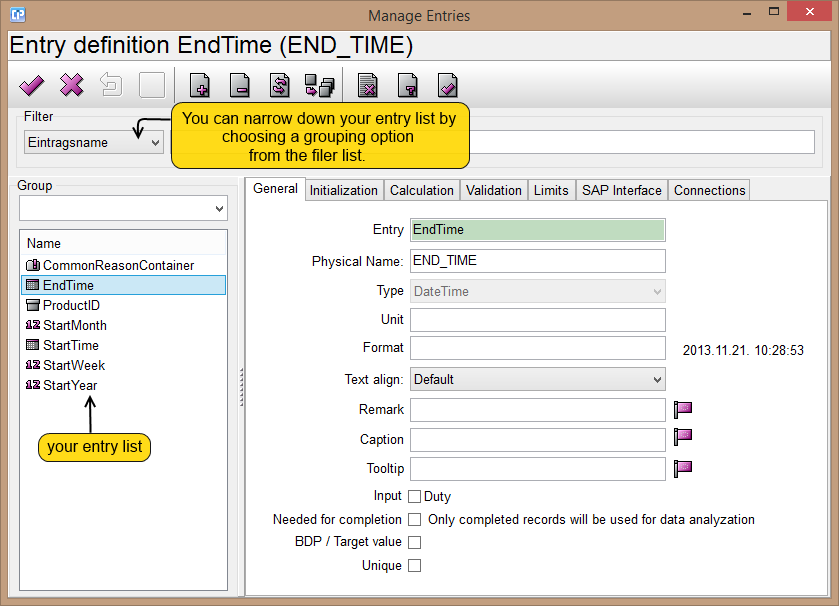
For example (as you can see below on the screenshot) one could define an entry called EndTime of the Date Time type
and use it for various objects that represent time lines.
Usually, an entry directly corresponds to a database field.
¶ Toolbar Buttons
With the following buttons you can create immediate modifications within your entries:
 - If you click on it, it validates the settings and the dialog also closes.
 - Closes the dialog and discards the unsaved changes. If you made a change in one of your entries a new Confirmation dialog of saving will appear.
 - If you make changes in one of your entries and want to undo your previous steps, click on this button.
 - If you make changes in one of your entries, you can click here to save them without closing the window.
 - If you want to create a new entry, click on this button.
 - If you want to delete one of your entries, choose it from your entry list, then click on this button.
 - If you make changes in one of your entries, click on this button to refresh the entry and activate your changes. Thus a new Confirmation dialog of saving will appear.
 - You can duplicate an entry selected from your entry list.
 - This button lists your unused entries.
 - This button lists your unknown entries.
¶ Tab Pages
The entry settings are logically grouped into the following tab pages:
