General
The General page (see screenshot below) shows basic information about the entry.
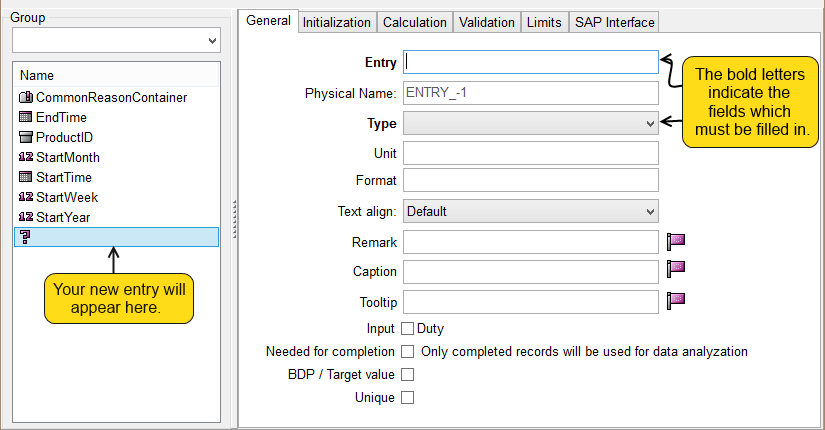
Entry - The name of your entry should be entered here. After entering the name, your list is going to reorganize itself according to the alphabetical order. Do not forget to apply the rules of the name conventions.
Physical Name - This name is going to appear in your database as a field name. If you leave it empty, the field will be automatically filled with a generated name.
Type - With the help of this feature, you can choose the type of your entry.
Unit
Format - With the help of this feature, you can specify the appearance of your entry in the grid.
Text Align - You can choose from default, left, right, and center to organize information within the entries.
Remark
Caption - This text will appear in the header of the grid and the corresponding components.
By clicking on the localization wizard  you can reach the localisation of this text.
Tooltip - This text will appear as a hint if the user drags the mouse over the corresponding component.
By clicking on the localization wizard you can reach the localisation of this text.
Input - If the user enters data into an object in which this particular entry is used, then if the small box near Input Duty is marked, the user will be warned to fill in the entry.
Needed For Completion - The completition feature will make a record complete if all the entries marked by this property are filled in within the record.
BDP/Target Value
Unique - If you use this property, the same data will not be allowed within the object. The property checks whether an entry is featured in a record set. If you mark the box, you will have the possibility to choose an object in which uniqueness is checked. If you mark a tree's branch then all its children will be checked. If you do not select any object, then the uniqueness will be checked in the actual object of the entry. See the screenshot below:
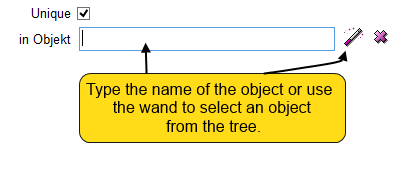
 - By clicking on the wand the Select Object dialog will appear.
 - With the help of this small cancel button you can delete the name of the object you have previously added or typed.