DBForm Properties
Properties
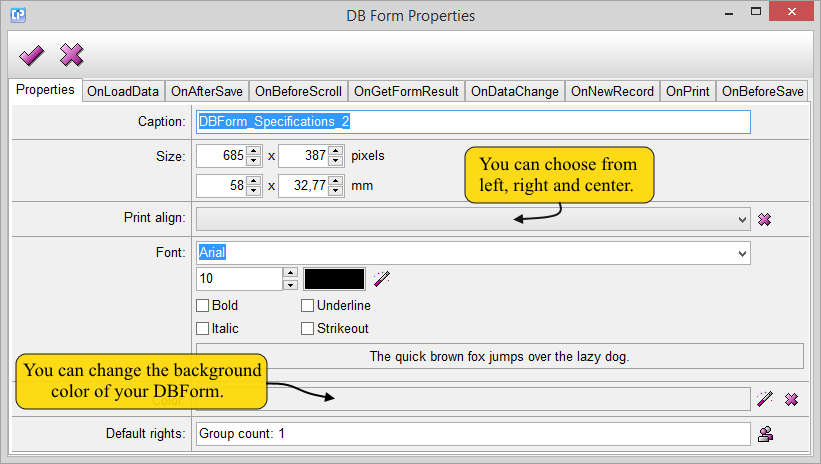
As you can see on the screenshot below, with the help of this tab, you can modify the main properties of your DBForm.
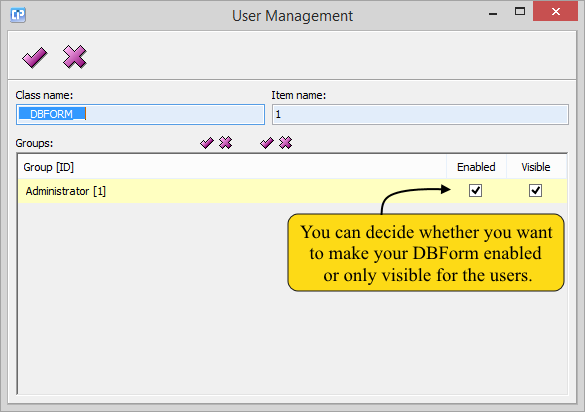
As you can see on the screenshot below, you can adjust the users' rights by clicking on the  button.
With the help of the other tabs, you can create formulas which are activated after or before different procedures.
To ease your process of creating a formula use the Formula Editor.
On Load Data
As its name shows, the script is executed when the DBForm is loaded and when
we change records with the help of the toolbar.
On After Save
With the help of this tab, you can activate your formula after the record is saved.
On Before Scroll
As its name shows, the script is executed when we scroll up or down on the screen.
On Get Form Result
The return value (a variant which can be anything) of the DBForm will be defined by this script.
This value is returned by the CallDBForm() function. This function is convenient when you use this
DBForm as a dialog in your project.
On Data Change
Your previously created script under this tab is executed when a value changes.
On New Record
With the help of this feature, you can create a script which is executed when a new record is added.
On Print
As its name shows, this script is executed before the DBForm is printed.
On Before Save
If you want your formula to be executed before the changes on your DBForm are saved, use this feature.