¶ Filename EditBox
Filename editboxes are useful if you want to create a component to which you want to add entries that have
the file type. With the help of this feature, you can load and open a chosen file through your DBForm with
the  and the
 buttons.
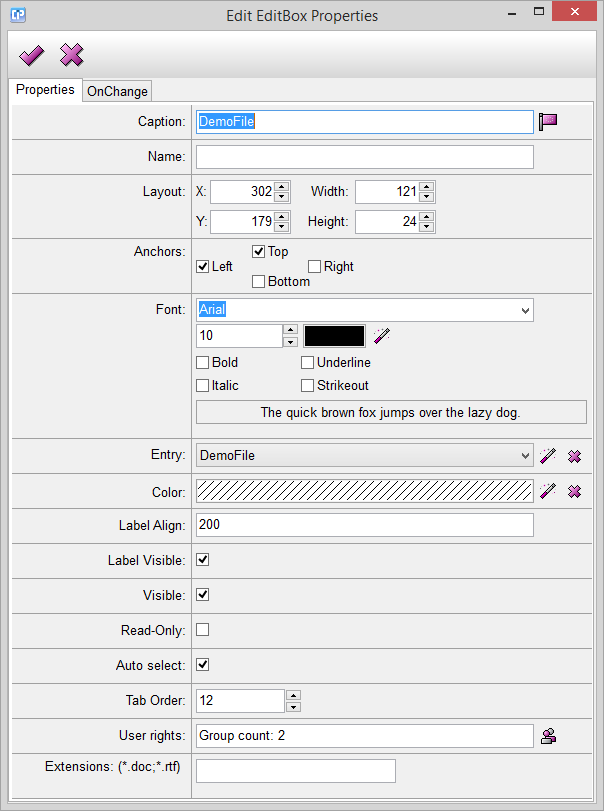
Caption: This feature enables you to add a text to your filename editbox. With the help of the  you can
open the Localization window.
Name: This feature helps you to give a name to your filename editbox. The name will not be visible on the
label.
Layout: The numbers near X and Y help you to adjust the exact coordinates of placing your filename editbox.
The Width and Height options refer to the length of the sides of your box.
Anchors: As its name shows, this feature anchors the chosen sides of your box (left, top, bottom, right).
This means that if you increase or decrease the background of your DBForm, the anchored sides of the
box will follow the movement of the respective side of the DBForm.
Font: With the help of this feature you can adjust the font of the caption. You can change the font type,
size, color and style.
Entry: You can add a file type entry to your filename editbox.
Click on the button and choose an entry from your entry list.
Cancel your modification with the help of the  button.
Color: This option helps you to change the color of your editbox without affecting the label part.
Click on the button and open the color dialog to choose your color from a complete palette.
Cancel your modification with the help of the button.
Label Align: This number modifies the distance between the label of the filename editbox and the box itself.
Label Visible: With the help of this feature, you can control the visibility of your label within the filename
editbox.
Visible: With the help of the visibility feature, you can decide whether you want your whole filename editbox
to be visible or not.
Read-Only: Tick this option if you want your chosen filename editbox to be read-only, that is uneditable.
Auto Select:
Tab Order: This feature enables you to specify the tab order, which can be helpful when you want to reach
one of your DBForm components with the help of the Tab button.
User Rights: With the help of this option you can decide who should have an access to your component.
Make a click on the  button and open the User Management window.
Extensions: You can choose between *.doc and *.rtf, or you can choose both. This option will reduce
your options when you want to select a file with the help of the button found near your filename editbox
component. If neither of the options are chosen, you can add any kind of file to your component.
¶ Formula
The formula written into the OnChange event runs when a value of an entry changes.
When creating a formula, do not forget to use the Formula Editor