¶ CIP_PrintDBForm
Calling convention: CIP_PrintDBForm("DBFormName": String, "ObjectName": String, DataID: Integer, "PrinterPackName": String)
Description: Builds and directly prints a database form for a selected object and record using a configured printer pack.
Parameters:
DBFormName = Database-form name. An empty string uses the object's linked form or an automatically generated form; AUTODBFORM explicitly requests an generated form.
ObjectName = Object name. An empty string creates a temporary object and permits only an explicitly named non-automatic form without record data.
DataID = Record ID to load, or -1 for printing without a data record.
PrinterPackName = Printer-pack name defining printer, page size, and margins.
Returns: No value. Invalid argument count, object, form, record ID, printer pack, or printing failure raises an exception.
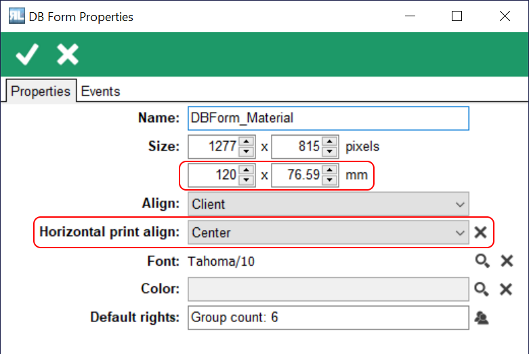
Availability: Desktop printing environment with access to the requested object/form and a configured printer pack. Printed size and horizontal alignment come from the database-form properties.
Example:
CIP_PrintDBForm("DBForm_Material", "Material", 1399, "Material Barcode");
CIP_PrintDBForm("", "Material", 1399, "Material Barcode");
CIP_PrintDBForm("AUTODBFORM", "Material", 1399, "Material Barcode");