¶ Units
This feature consists of a vast data of units of measurements which are inevitable when solving technical
problems.
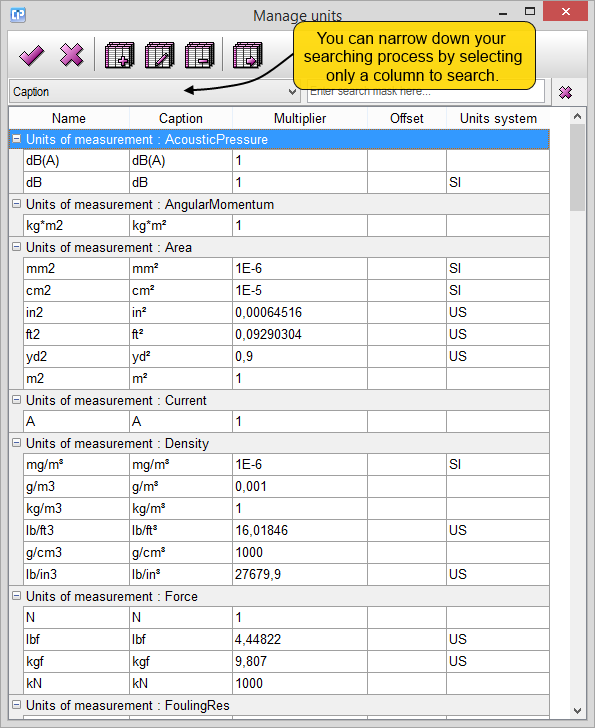
Although the feature in itself is a lexicon-like data container, it comes in handy when using the
Unit calculator from the Tools menu.
The Units menu is necessary if you want to add new units of measurements which are part of a more
sophisticated measuring system.
This way, with the help of the  and the
 buttons, you can add a new or edit a previously
selected unit.
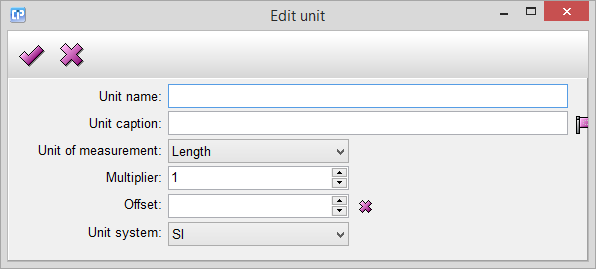
- Unit name - the name of the new unit you want to introduce.
- Unit caption - the abbreviated version of the unit which will be visible when using it throughout
your work.
- Unit of measurement - as you can see, the table containing the units is separated into
different measurement types.
These are:
- acoustic pressure
- angular momentum
- area
- current
- density
- force
- fouling resistance
- frequency
- heat transfer coefficient
- latent heat
- length
- liquid load
- mass flow rate
- molar mass
- volume flow rate
- percent
- power
- pressure
- specific evaporation rate
- specific heat
- surface tension
- temperature
- thermal condition
- time interval
- torque
- velocity
- viscosity
- voltage
- volume
- volume flow rate
By choosing a type of measurement, you can group your newly inserted unit.
- Multiplier - with the help of this feature, you can adjust proportionality that measures
how much your unit changes compared to the SI basic units or to the US customary units.
- Offset - this feature is similar to the Multiplier, only that it is able to register the difference between
the units of the SI and US systems.
- Unit system - this feature enables you to choose from two systems of measurements (International
System of Units, United States customary units) and thus mark your newly inserted unit.
With the help of the  button you can duplicate a selected unit, while with the help of the
 button,
you can delete one.