¶ Setup of the Main DataGrid
¶ Header
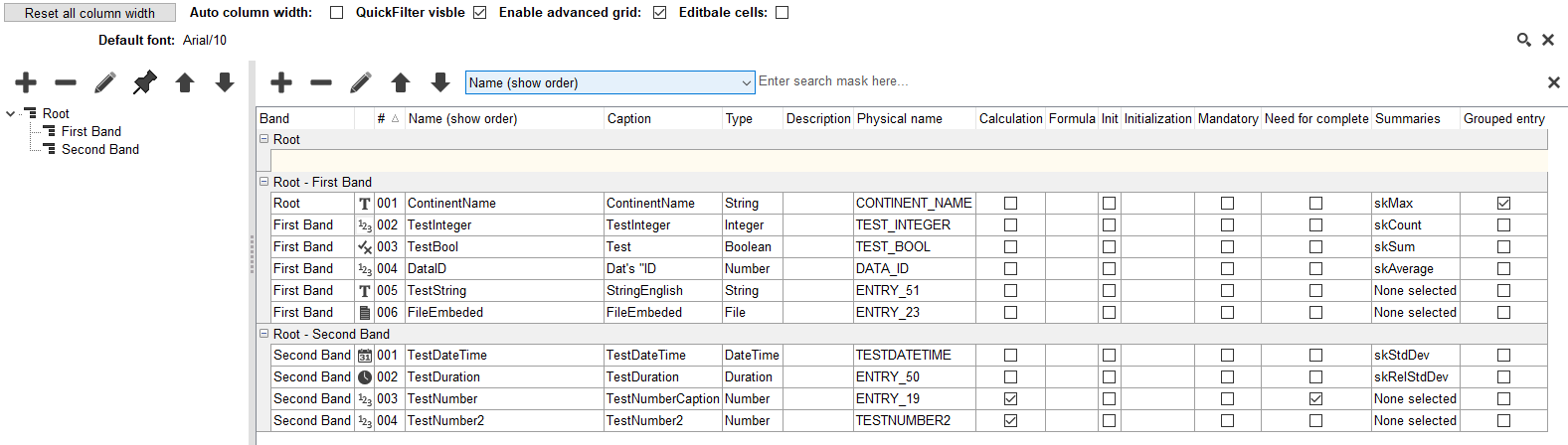
Reset all column width: column width are stored in CIP for each User, if You want to get back the default column widths, you can remove the saved user values with this button.
Auto column width: CIP calculates the automatic column size (can be slow)
QuickFilter visible: it will show a Quick filter on the Top of the Grid.
Enabled advanced grid: automated search, filter, sort functions will be available for the Grid, it may slows down the grid.
Editable cells: if set, the users can enter data for the Grid.
¶ Bands Tree
The left tree shows the structure of the Grid Bands.
Fists Band can be frozen, to make sure it is always visible when scrolling.
¶ Entry Lists
You can set which entries should be visible in the special bands.
Invisible Entries (e.g. entries from older versions assigned to root), will be shown in yellow area if Bands are available. You can drag'drop the columns to the Bands.
¶ Summaries
The Grid can show the listed summaries of the Data, on the bottom of each column.
¶ Grouped entry
The Grids can create fold-able groups for the Data.